Formal
Algorithm
Common
Docker
Javascript
Network
Node
Notes
c++
c++Lib
golang
Javascript
Webpack
Vite
Webassembly
MCU
Protocol
ML
Compilation
DataStructure
Algorithm
MC_MP_Programming
ResearchMethod
PrivacySecurity
EfficientAlgorithm
AdvancedAlgorithmicTech
AlgorithmGameTheory
LowCodeProject
ComputerCompose
Network
LinearMath
OperationSystem
Mathmatic
What is an accelerator?
Accelerators - Any non-CPU piece of hardware that can carry out work
There are two major examples of this:
- Graphics Processing Unit (GPU) - A specialised processor designed to accelerate graphics processing
- Field Programmable Gate Array (FPGA) - A piece of silicone with programmable logic gates
How do we use an accelerator?
Kernel - The name for a portion of code is sent to an accelerator Offloading - The term for sending work intended for the CPU to an accelerator
What frameworks will we cover?
Types of framework
- OpenMP
- OpenCL
- OpenACC
- CUDA
Programmatic
- Uses specific function calls to give a high amount of control over the behaviour
- This is typically non-portable
- Prescriptive - User explicitly specifies actions to be taken by the compiler
Directive
- Uses compiler flags to describe how the parallelism should be done
- Portable
- Descriptive - User ‘describes’, guides, the compiler but the compiler itself makes the final decision
OpenACC
To address it’s issues OpenACC had 3 major design pillars
-
Simplicity - OpenCL can be quite tricky to learn OpenCL requires several steps to get a kernel to run on an accelerator
- Declare variables for the input
- Declare variables for the GPU buffer
- Create a reference to the accelerator
- Create a command queue for that accelerator
- Initialise the buffer
- Carry out the work
- Free the memory
-
Power - OpenCL has poor support for crypto and machine learning
- Applications developed using OpenACC have significant speed increases, especially considering the amount of code required
-
Portability - There was no dominant manufacturer so supporting a variety of accelerators was important
A directive is just giving the compiler general instructions Compiler developers have much more freedom to figure out exactly how best to program that
- Nvidia has pledged support for all of it’s boards
- AMD has provided support so far, but refuses to guarantee this will continue
- Intel has said it will in the future
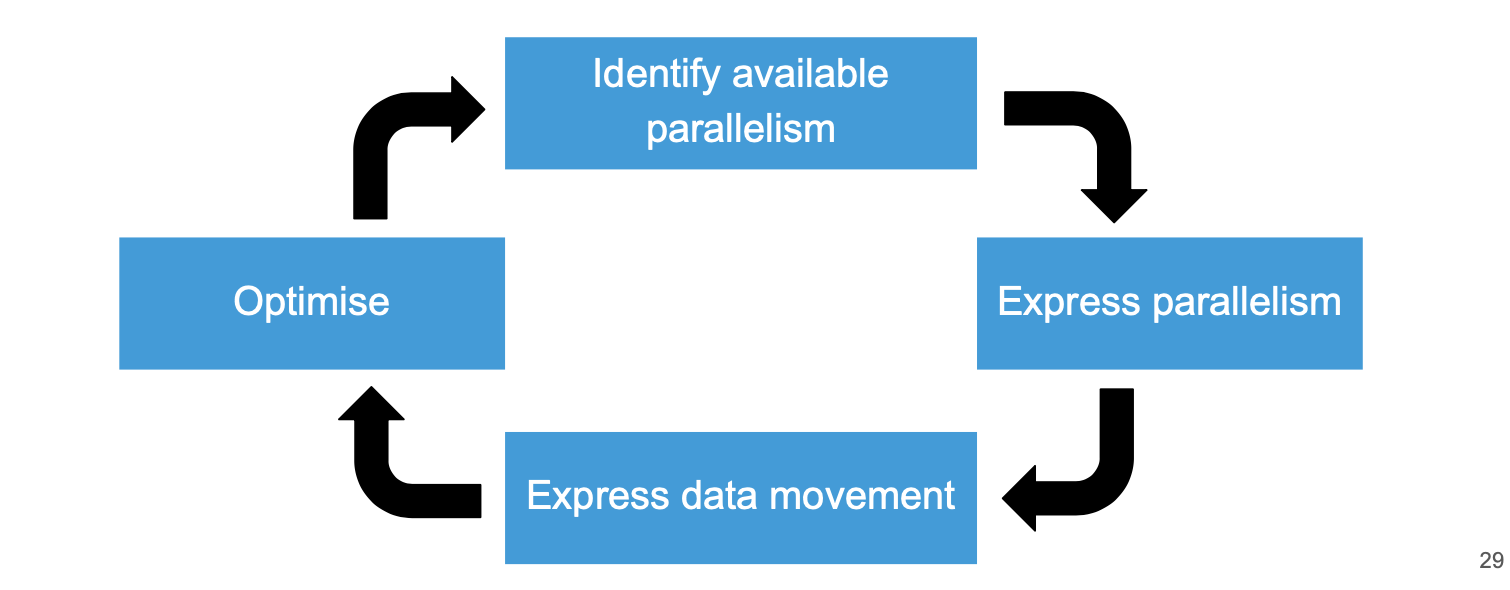
#pragma acc kernels - Automatically distribute loops across accelerator threads
Example for express parallelism
#pragma acc kernels {
  for (int i = 0; i < N; i++) {
    x[i] = i;
    y[i] = i * i;
  }

  for (int i = 0; i < N; i++) {
    z[i] = x[i] * y[i];
  }
}
#pragma acc parallel - Explicitly state that this portion of code should be parallelised. Works for loops or segments of code
Example
#pragma acc parallel {
  for (int i = 0 ; i < N; i++) {
    x[i] = i;
    y[i] = i * i;
  }
}
#pragma acc loop - Explicitly state that this portion of code should be workload shared in a similar way to OpenMP
Example
#pragma acc loop {
  for (int i = 0 ; i < N; i++) {
    x[i] = i;
    y[i] = i * i;
  }
}
#pragma acc data - This sets up data permanence on the accelerator, this is regardless of threads being created and destroyed
#pragma acc data {
  #pragma acc parallel {
    for (int i = 0 ; i < N; i++) {
      x[i] = i;
      y[i] = i * i;
    }
  }
}
copy - Specify what data must go to the accelerator, this then returns
#pragma acc data copy (x, y)
#pragma acc parallel {
  for (int i = 0 ; i < N; i++) {
    x[i] = i;
    y[i] = i * i;
  }
}
copyout - This tells the compiler the data should be returned, if it isn’t specified as copied in then it creates a variable on the accelerator
create - This creates a local variable on the accelerator, this is good for temporary variables
OpenCL
Omputational intensity - The proportion of mathematical operations to unique memory operations.
Maths isquite fast, floating point muktiplication takes about clock cycles Memory is quite slow, loading from RAM takes arounds.
| Mathematical operations | Unique memory operations |
|---|---|
| a[i] = b[i] + c[i] | 1: 3 3:300 |
| a[i] = b[i] + c[i] _ d[i] | 2: 4 6:400 |
| a[i]++ | 1: 2 3:200 |
| a[i] += a[i] _ a[i] | 2: 1 6:100 |
OpenCL structure
- Complication
- Create a program
- Compile
- Create the kernels
- Setup
- Get the devices and platform
- Create a context
- Create a command queue
- Runtime
- Create memory objects
- Copy data to the GPT
- Set the kernel arguments
- Execute the kernels
- Copu the data bakc from the GPU
- Wait for the commands to finish
How do we use GPUs
Use of dimensions
Work item - A thread associated with a particular elements of the computer
Global dimensions - How many dimensions does the data have
Local dimensions - A smallerworkable chunk of the global dimension
Why should we focus on GPUs?
-
The power of GPUs is growing at a much faster rate than CPUs
-
The speed of improvement is impressive, it is likely that languages will start adding dedicated support for GPUs by default
-
There are two major factors stopping widespread adoption
- The reconfiguring time is still very high and variable (1 hour - 30 hours)
- The size of the programmable arrays is still quite limited
-
Field Programmable Gate Arrays (FPGA)
-
Configurable Logic Blocks (CLB)
-
AI Accelerator (AIA)
-
Cryptographic Accelerator (CA)
CUDA
It’s likely to be the language you will program in if you go into heavy HPC work So why might somebody choose this over OpenCL?
- There are specific read and write libraries that are very efficient
- There is a software caching mode that handles data transfer
- There is a wide variety of libraries
- The development tools are incredibly well done
GPU Computing Using CUDA
What is a GPU
- Special type of co-processor to accelerate graphics computation
- Contains many low-powered cores
- Has a special memory architecture
GPGPU
- Use of GPR to perform things other than graphical computations
- Bioinformatics
- Cryptography
- Neural Networks
- AI -Image Processing
- First occurred as “abuse/misuse” of graphical APIs
- BrookGPU was an early and influential framework
CUDA Basics
-
Architecture
- Host -CPU
- Device -GPU
- Program and Data is passed along PCIe
- K Kultiprocessors GLobal memory divided into memory blocks of b size
-
Memory Model
- Host and Device access global memory (Unifed memory?)
- Shared memory accessed only by threads on that MP (multi processes)
- Private per-thread memory is allocated on shared memory
- Features of …
-
Programming Model
- A
kernelis a program written for a GPU. We write the program in CUDA C, and gives the instructions for one thread. Then we run many threads on the GPU at the same time - Each thread follows the same instructions - they execute in lock step
- Threads are organized into Grids, Warps and Blocks
- A
Grids Blocks and Warps
- The
Gridof threads represents all threads launched on the GPU - The Grid is divided in to Blocks
- You specify the size
- Blocks are resident on one SM(multiple of warp size)
- Threads within a block can communicate via shared memory
- Threads in a block
- Blocks are divided into Warps
Accessing Memory
-
We access memory in CUDA C like we would do in a C array
- However we should make it coalesce
- To use a value in global memory, it must be featched from global and placed in shared memory
- This causes a whole block to be fetched from global into shared - potentially expensive
-
When we access shared mempry, we can access b distinct banks in parallel
- otherwise it can cause a bank conflick and will serialise
Sample Programs to Demonstrate CUDA
Example:
// Kernel definition
// CUDA Kernel Device code

__global__ void vectorAdd(const float *A, const float *B, float *C, int numElements) {
  int i = blockDim.x * blockIdx.x + threadIdx.x;
  if(i < numElements) {
    C[i] = A[i] + B[i] + 0.0f
  }
}
CUDA Recipe
CUDA Recipe - This is the name of the standard approach to carrying out this task
Process of CUDA Recipe
-
Convert the code into a serial kernel
- The separated method could be ran on another computer
int *calculate(int *a, int *b, int *c) { for(i = 0; i < 40; i++){ c[i] = a[i] + b[i]; } return c; } int main() { int i; int *a = (int *)malloc(40 * sizeof(int)); int *b = (int *)malloc(40 * sizeof(int)); int *c = (int *)malloc(40 * sizeof(int)); // Read a file to assign a and b values c = calculate(a, b, c); free(a); free(b); free(c); } -
Make it a CUDA kernel by adding “global”
- Adding global above a function turns it into a CUDA function
__global__ int *calculate(int *a, int *b, int *c) { for(i = 0; i < 40; i++){ c[i] = a[i] + b[i]; } return c; } int main() { int i; int *a = (int *)malloc(40 * sizeof(int)); int *b = (int *)malloc(40 * sizeof(int)); int *c = (int *)malloc(40 * sizeof(int)); // Read a file to assign a and b values c = calculate(a, b, c); free(a); free(b); free(c); } -
Replace loops in the CUDA kernel (thread id indexing)
- Even though there is only one element being altered by each thread, the whole array must be returned
__global__ int *calculate(int *a, int *b, int *c){ int thread_id = (blockIdx.x * blockDim.x) + threadIdx.x for(i = 0; i < 40; i++){ c[thread_id] = a[thread_id] + b[thread_id]; } return c; } int main() { int i; int *a = (int *)malloc(40 * sizeof(int)); int *b = (int *)malloc(40 * sizeof(int)); int *c = (int *)malloc(40 * sizeof(int)); // Read a file to assign a and b values c = calculate(a, b, c); free(a); free(b); free(c); } -
Handle problem sizes smaller than the thread number
- Adding the condition seems fairly obvious
- Debugging parallel code can be quite tricky to do
__global__ int *calculate(int *a, int *b, int *c){ int thread_id = (blockIdx.x * blockDim.x) + threadIdx.x; if(thread_id < 40) c[thread_id] = a[thread_id] + b[thread_id]; return c; } -
Allocate device memory
__global__ int *calculate(int *a, int *b, int *c){ int thread_id = (blockIdx.x * blockDim.x) + threadIdx.x; if(thread_id < 40) c[thread_id] = a[thread_id] + b[thread_id]; return c; } int main() { int i; int *device_a, *device_b, *device_c; int *a = (int *)malloc(40 * sizeof(int)); int *b = (int *)malloc(40 * sizeof(int)); int *c = (int *)malloc(40 * sizeof(int)); // set up device memory cudaMalloc(&device_a, 40 * sizeof(int)); cudaMalloc(&device_b, 40 * sizeof(int)); cudaMalloc(&device_c, 40 * sizeof(int)); // Read a file to assign a and b values c = calculate(a, b, c); free(a); free(b); free(c); } -
Copy data from host to device
__global__ int *calculate(int *a, int *b, int *c){ int thread_id = (blockIdx.x * blockDim.x) + threadIdx.x; if(thread_id < 40) c[thread_id] = a[thread_id] + b[thread_id]; return c; } int main() { int i; int *device_a, *device_b, *device_c; int *a = (int *)malloc(40 * sizeof(int)); int *b = (int *)malloc(40 * sizeof(int)); int *c = (int *)malloc(40 * sizeof(int)); // set up device memory cudaMalloc(&device_a, 40 * sizeof(int)); cudaMalloc(&device_b, 40 * sizeof(int)); cudaMalloc(&device_c, 40 * sizeof(int)); // Read a file to assign a and b values // copy to device cudaMemcpy(device_a, a, 40 * sizeof(int), cudaMemcpyHostToDevice); cudaMemcpy(device_b, b, 40 * sizeof(int), cudaMemcpyHostToDevice); c = calculate(a, b, c); free(a); free(b); free(c); } -
Call the CUDA kernel
- Adding <<<x, y>>> between the function name and parameters sends it to the GPU
- x - Number of blocks to use
- y - Number of threads per block
__global__ int *calculate(int *a, int *b, int *c){ int thread_id = (blockIdx.x * blockDim.x) + threadIdx.x; if(thread_id < 40) c[thread_id] = a[thread_id] + b[thread_id]; return c; } int main() { int i; int *device_a, *device_b, *device_c; int *a = (int *)malloc(40 * sizeof(int)); int *b = (int *)malloc(40 * sizeof(int)); int *c = (int *)malloc(40 * sizeof(int)); // set up device memory cudaMalloc(&device_a, 40 * sizeof(int)); cudaMalloc(&device_b, 40 * sizeof(int)); cudaMalloc(&device_c, 40 * sizeof(int)); // Read a file to assign a and b values // copy to device cudaMemcpy(device_a, a, 40 * sizeof(int), cudaMemcpyHostToDevice); cudaMemcpy(device_b, b, 40 * sizeof(int), cudaMemcpyHostToDevice); c = calculate<<<5, 8>>>(a, b, c); free(a); free(b); free(c); } -
Copy data from device to host
 int main() {
   int i;
   int *device_a, *device_b, *device_c;
   int *a = (int *)malloc(40 * sizeof(int));
   int *b = (int *)malloc(40 * sizeof(int));
   int *c = (int *)malloc(40 * sizeof(int));
   // set up device memory
   cudaMalloc(&device_a, 40 * sizeof(int));
   cudaMalloc(&device_b, 40 * sizeof(int));
   cudaMalloc(&device_c, 40 * sizeof(int));
   // Read a file to assign a and b values
   // copy to device
   cudaMemcpy(device_a, a, 40 * sizeof(int), cudaMemcpyHostToDevice);
   cudaMemcpy(device_b, b, 40 * sizeof(int), cudaMemcpyHostToDevice);
   c = calculate<<<5, 8>>>(a, b, c);
   // copy results back
   cudaMemcpy(c, device_c, 40 * sizeof(int), cudaMemcpyDeviceToHost);
   free(a);
   free(b);
   free(c);
 }