Formal
Algorithm
Common
Docker
Javascript
Network
Node
Notes
c++
c++Lib
golang
Javascript
Webpack
Vite
Webassembly
MCU
Protocol
ML
Compilation
DataStructure
Algorithm
MC_MP_Programming
ResearchMethod
PrivacySecurity
EfficientAlgorithm
AdvancedAlgorithmicTech
AlgorithmGameTheory
LowCodeProject
ComputerCompose
Network
LinearMath
OperationSystem
Mathmatic
浏览器中的跨页面通信
日期:2019-11-14 16:49:00
更新:2019-11-14 16:49:00
标签:前端, Javascript
分类:Javascript
浏览器可以打开很多个不同的,有时候我们需要跨页面进行数据传递或者触发页面中某个特效的时候,这时你可能需要用到跨页面的通信。怎么样实现?下面就来看一下浏览器的跨页面方式~
前言
浏览器可以打开很多个不同的,有时候我们需要跨页面进行数据传递或者触发页面中某个特效的时候,这时你可能需要用到跨页面的通信。怎么样实现?下面就来看一下浏览器的跨页面方式~
同源之间的跨页面通信
1.BroadcastChannel
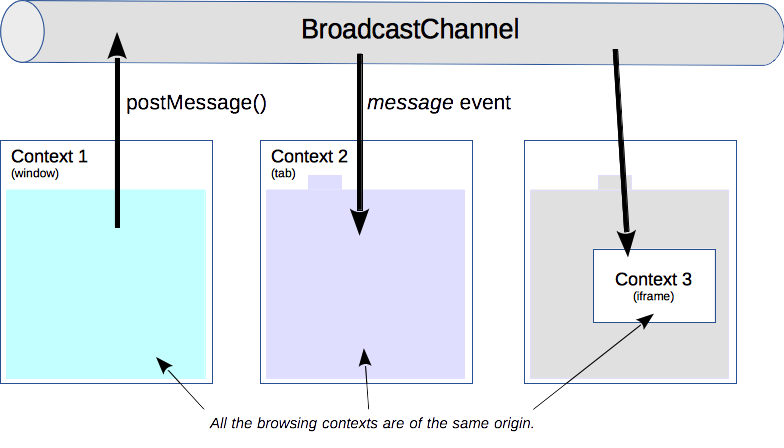
The Broadcast Channel API allows simple communication between browsing contexts (that is windows, tabs, frames, or iframes) with the same origin (usually pages from the same site).
BroadcastChannel API 允许在相同的源(通常页面来自相同的网站)在浏览器上下文(windows,tabs,frames或者iframes)之间进行简单的通信
-
通信原理(图片来源)
可以看出 BroadcastChannel 是在网页中创建一个通信频段,所有加入该频段的页面都可以接发消息,但是它们必须是相同的源。
-
BroadcastChannel 对象
事件:
onmessage: 监听到有数据发送时触发;
messageerror: 监听到消息错误是触发;
方法:
postMessage(msg: any): 发送消息;
close(): 关闭 channel; -
举例
了解完BroadcastChannel,那就来来写一个 demo 来玩玩:
我们需要写两个页面,一个负责发送消息页面,一个负责接收消息并返回接收到的信息到第一个页面发送消息页面:
<!DOCTYPE html>
<html>
  <head>
    <title>sendMessage</title>
  </head>
  <body>
    <div>
      <p>
        <input id="input" value="" />
      </p>
      <p>
        <button id="btn">发送信息</button>
      </p>
      <p id="getMsg"></p>
    </div>
    <script>
      const channel = new BroadcastChannel("test_channel");
      const input = document.querySelector("#input");
      const btn = document.querySelector("#btn");
      const getMsg = document.querySelector("#getMsg");

      // 发送消息
      btn.addEventListener(
        "click",
        (e) => {
          channel.postMessage(input.value);
        },
        false
      );

      // 接口反馈信息
      channel.onmessage = function (event) {
        getMsg.innerText = event.data;
      };
    </script>
  </body>
</html>
接收消息页面:
<!DOCTYPE html>
<html>
  <head>
    <title>getMessage</title>
  </head>
  <body>
    <p id="showMsg"></p>
    <script>
      const channel = new BroadcastChannel("test_channel");
      const showMsg = document.querySelector("#showMsg");
      channel.onmessage = function (event) {
        showMsg.innerText = event.data;
        channel.postMessage(`接收到消息:${event.data}`);
      };
    </script>
  </body>
</html>
打开两个页面运行运行后可以看到
sendMessage页面发送的消息可以被getMessage接收啦.
2.sharedWorker
The SharedWorker interface represents a specific kind of worker that can be accessed from several browsing contexts, such as several windows, iframes or even workers. They implement an interface different than dedicated workers and have a different global scope
SharedWorker 代表一个特定类型的 worker 去访问几个浏览器上下文,例如几个 windows,iframes 或者甚至是 workers。他们实现一个不同于专用 workers 的接口,并且具有不同的全局作用域。
-
sharedWorker需要我们手工实现一个在浏览器后台运行的worker,页面通过该 worke 进行链接和信息的传递 -
举例
与上文的例子一样,需要创建两个 html 页面,一个发送消息,一个接收消息。
除此之外,还要实现一个worker,用于保存创建链接的页
worker.js:
// worker.js
const ports = [];
// 链接时触发
onconnect = (event) => {
  const port = event.ports[0];
  ports.push(port);
  port.onmessage = (e) => {
    ports
      .filter((p) => p !== port) // 广播消息时把自己除掉
      .forEach((p) => p.postMessage(e.data)); // 向链接池里的用户发送消息
  };
};
发送消息页面:
<!DOCTYPE html>
<html>
  <head>
    <title>shareWorker_send</title>
  </head>
  <body>
    <div>
      <p>
        <input id="input" value="" />
      </p>
      <p>
        <button id="btn">发送信息</button>
      </p>
      <p id="getMsg"></p>
    </div>
    <script>
      const worker = new SharedWorker("./worker.js");
      const input = document.querySelector("#input");
      const btn = document.querySelector("#btn");
      const getMsg = document.querySelector("#getMsg");

      worker.port.start(); // 开启worker

      btn.onclick = function () {
        worker.port.postMessage(input.value);
      };

      worker.port.onmessage = function (event) {
        getMsg.innerText = event.data;
      };
    </script>
  </body>
</html>
接收消息页面:
<!DOCTYPE html>
<html>
  <head>
    <title>shareWorker_get</title>
  </head>
  <body>
    <p id="showMsg"></p>
    <script>
      const worker = new SharedWorker("./worker.js");
      const showMsg = document.querySelector("#showMsg");
      worker.port.start();
      worker.port.onmessage = function (event) {
        showMsg.innerText = event.data;
        worker.port.postMessage(`接收到消息:${event.data}`);
      };
    </script>
  </body>
</html>
3.监听 localStorage 事件
原理是通过监听storage事件,给页面做出相应的动作。
- 举例
发送页面:
<!DOCTYPE html>
<html>
  <head>
    <title>changeStorage</title>
  </head>
  <body>
    <div>
      <p>
        <input id="input" value="" />
      </p>
      <p>
        <button id="btn">发送信息</button>
      </p>
      <p id="getMsg"></p>
    </div>
    <script>
      const input = document.querySelector("#input");
      const btn = document.querySelector("#btn");
      const getMsg = document.querySelector("#getMsg");
      localStorage.setItem("test", "defaultValue"); // 设置一个默认值
      btn.onclick = function () {
        localStorage.setItem("test", input.value);
      };
    </script>
  </body>
</html>
接收页面:
<!DOCTYPE html>
<html>
  <head>
    <title>getStorage</title>
  </head>
  <body>
    <p id="showMsg"></p>
    <script>
      const showMsg = document.querySelector("#showMsg");
      window.addEventListener(
        "storage",
        (event) => {
          showMsg.innerText = `key:${event.key} \n 旧值:${event.oldValue} \n 新值: ${event.newValue}`;
        },
        false
      );
    </script>
  </body>
</html>
4.window.opener
-
window.opener指的是打开该页面的前一个页面。例如,在 a.html 中通过 window.open 打开了一个 b.html 页面,那么 b.html 页面中的window.opener指的是 a.html 页面。而 a.html 不是从任何一个页面中打开的,所以window.opener为空; -
举例
来写一个父页面打开一个新的页面, 再通过新打开的页面改变父页面展示的 demo 父页面 `htmlparent child.htmldefault
`子页面 ``` html <!doctype html> <html> <head> <title>child</title> </head> <body> <p id="showMsg"></p> <script> if (window.opener) { const showMsg = document.querySelector('#showMsg'); showMsg.innerHTML = '我是通过父页面parent.html打开的'; window.opener.document.querySelector('#childModify').innerText = '我是通过子页面修改的!'; // 改变父页面展示 } </script> </body> </html> ```
跨域的页面通信
1.iframe
有时候有两个业务需要互相通信,但这两个页面在不同的域名上。这时我们可以通过 iframe 的进行通信
- 原理
通过获取iframe对象的window,向window发送消息
iframe子页面通过监听message事件作出相应的动作 - 举例
为了模拟两个不同源页面的,我们需要搭建两个不同端口的web服务,下面是node的代码(使用koa)
node 服务端:
// app.js
const Koa = require("koa");
const koaStatic = require("koa-static");
const path = require("path");

const app = new Koa();
app.use(koaStatic(path.resolve(__dirname, "assets", "commiunation")));

app.listen(9999, () => {
  console.log(`server running at 9999`);
});

app.listen(8888, () => {
  console.log(`server running at 8888`);
});
我们分别监听了9999和8888端口,父页面用9999端口打开,父页面的 iframe 路径填8888端口的 URL
父页面
<!DOCTYPE html>
<html>
  <head>
    <title>windowPostMessage</title>
  </head>
  <body>
    <div>
      <p>
        <input id="input" value="" />
      </p>
      <p>
        <button id="btn">发送信息</button>
      </p>
      <p id="getMsg"></p>
    </div>
    <!-- 与父页面不同源 -->
    <iframe src="http://localhost:8888/window/get.html" id="iframe"></iframe>
    <script>
      const input = document.querySelector("#input");
      const btn = document.querySelector("#btn");
      const getMsg = document.querySelector("#getMsg");
      const ifm = document.querySelector("#iframe");

      btn.addEventListener(
        "click",
        (e) => {
          ifm.contentWindow.postMessage(input.value, "*"); // 向iframe子页面发送消息
        },
        false
      );

      window.addEventListener(
        "message",
        (e) => {
          getMsg.innerText = e.data;
        },
        false
      );
    </script>
  </body>
</html>
iframe页面
<!DOCTYPE html>
<html>
  <head>
    <title>windowGetMessage</title>
  </head>
  <body>
    <p id="showMsg"></p>
    <script>
      const showMsg = document.querySelector("#showMsg");

      window.addEventListener("message", (event) => {
        showMsg.innerText = event.data;
        event.source.postMessage(`信息已收到:${event.data}`, "*"); // 向父页面发送消息
      });
    </script>
  </body>
</html>
2.基于服务端
除了 iframe 可以进行跨域的跨页面通信,还可以通过服务器端进行页面间的通信。
其通信的原理其实很简单,就是需要通信的页面都与同一个服务端进行链接,一个页面向服务端发送消息,服务端将信息转发到其他与服务端进行链接的页面。
我们用 HTML5 中的WebSocket来一个例子吧
- 举例
websocket需要通过服务器端进行通信,因此需要做一个 websocket 的服务端:
"use strict";
const http = require("http");
const WebSocket = require("ws");
const server = http.createServer((req, res) => {
  res.writeHead(200, { "Content-Type": "text/plain" });
  res.end("");
});
const connObj = {}; // 存放进入链接的socket对象

const wss = new WebSocket.Server({ server });

wss.on("connection", (ws) => {
  onMessage(ws);
  connObj[ws.protocol] = ws; // 记录进来的socket对象
});

// 发送消息推送
function onMessage(ws) {
  ws.on("message", (message) => {
    message = JSON.parse(message);
    // 给指定的用户发送消息
    if (connObj[message.to]) {
      connObj[message.to].send("接收到信息:" + message.data);
    }
  });
}
server.listen(12345, () => {
  console.log(12345);
});
写两个前端的页面测试
pageA:
pageB:
将页面放到上文写好的 web 服务中,用
8888端口的服务打开pageA,9999打开pageB:
基于服务端的通信,除了WebSocket,还有SSE,有兴趣的可以去查看一下,这里就不多说啦~!
3.visibilityState
其原理是每次进入该页面时都会触发,然后再手工地去调用接口获取信息,具体使用
小结
通过文章了解了同源和跨域下的跨页面的通信,我们来总结一下
-
同源的跨页面通信
BroadcastChannel:使用简单,但兼容性比较差;sharedWorker:使用复杂,需要手工去写一个 worker 进行链接;- 监听 localStorage 事件: 通过监听 window 下的
storage事件,localStorage修改时才会触发事件,而且不同的 chrome 实例也能触发 storage 事件; window.opener:可以找到指定的浏览器窗口进行消息传递;- 还有其他的通过浏览器中的
WebSql和IndexDb也可以进行跨页面的信息的传递;
-
跨域的跨页面通信
iframe:通过父页面的 iframe 传递消息WebSocket:通过建立一条持续的TCP链接与服务端进行通信,如果需要长时间建立链接,需要发送心跳包保持 TCP 链接visibilityState: 页面进入时触发,在去手工调用后端信息,以达到数据更新的效果
浏览器中的跨页面通信有很多种方法,或许文章中还有很多未被提及,也欢迎大佬们来科普。如有错误请指出~~